Sawdust
Built by a deck builder, for deck builders

Save hours every week and stop the mistakes that eat your profit.

One system, set up around your company, that takes a deck from the first phone call to the final walkthrough. Draw and price it in the yard, then follow the build on site and from the office until it's done. It's the system a working Michigan deck company runs on every day.

Free for 30 days. No card.

Less time, fewer mistakes

The same steps happen the same way on every job, so nothing depends on someone remembering.

Quotes in minutes, not evenings

Draw the deck and the material list and price come out of it, from your own costs. The price goes straight onto the job.

Fewer ordering mistakes

Boards come out cut to the right lengths, and framing, footings, stairs and screws are counted the same way every time.

Tasks that hand themselves out

When a job reaches a step, it lands on the right person's to-do list by itself. Anything not assigned goes to the owner, so nothing gets missed.

Follow the build on and off site

The crew clocks in to the job, checks off steps and adds photos from the yard, and a step can require photos before it's marked done. You see it all from the office or the truck, and the job closes itself when the last step is checked.

Know what it takes to hit your goal

Put in your costs, your crew and the income you want. It shows how much you need to sell, about how many jobs that is, and whether your crew can build that much in a season.

Reminders you don't have to set

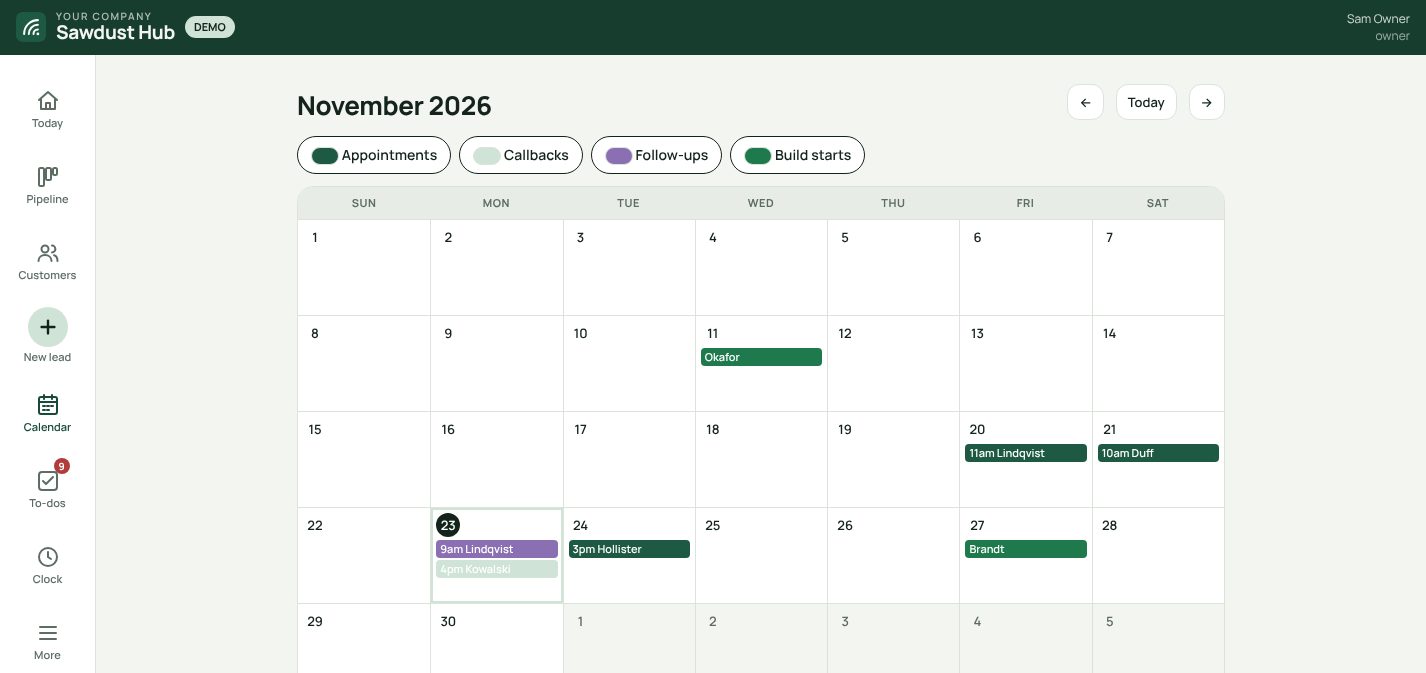
Callbacks, appointments to confirm, quote follow-ups and leads missing info show up on Today on their own. Estimates and build days land on each person's Google, iPhone or Outlook calendar, and the crew only sees the builds.

It's set up around how you work: your own checklist, who handles what, your prices, your crew's speed and your logo. And it keeps working with no signal, then catches up when you're back in range.

Coming next: booking emails and texts that ask the customer to confirm with one tap.

What it does for you

Everything below is the real app. The demos are open to try with made-up numbers, no sign-up.

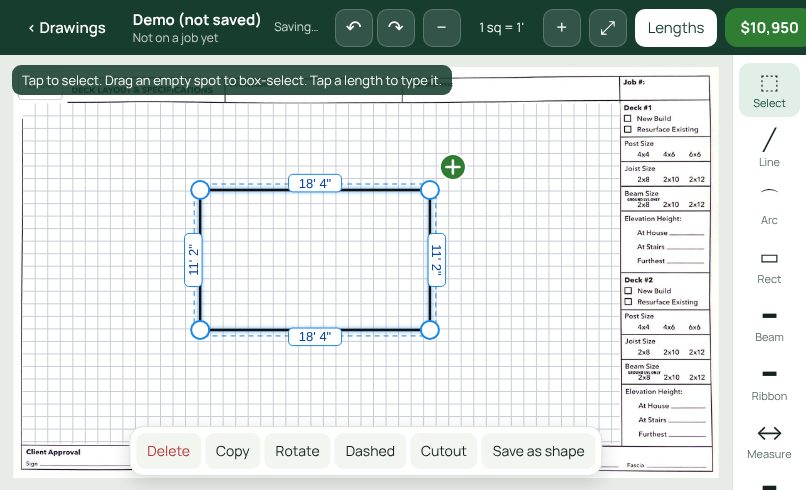
A deck drawn on the drawing sheet with lengths, a ribbon board and stairs

Draw it in the customer's yard

Sketch the deck on an iPad while you're standing there.

  • Decks, stairs, beams, posts, railing and ribbon boards
  • Lines snap square, and you can type exact lengths
  • Your logo on a clean drawing sheet the customer can sign
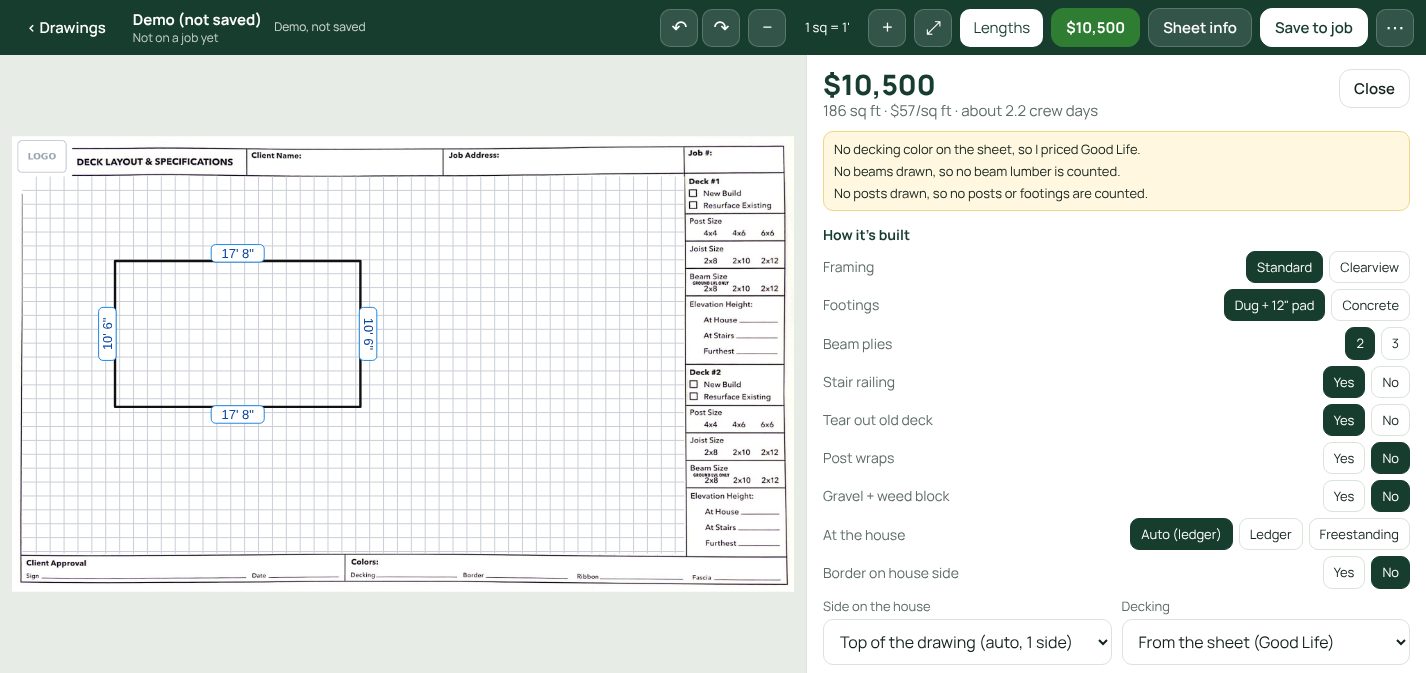
The drawing next to its price and build options

Price it before you leave the driveway

The drawing turns into a full material list and a price.

  • Boards cut to the right lengths, so you don't over-order
  • Framing, footings, fascia, stairs and color-match screws counted for you
  • Railing in vertical, horizontal, cable or glass, priced from the parts
  • Labor from how fast your own crew builds
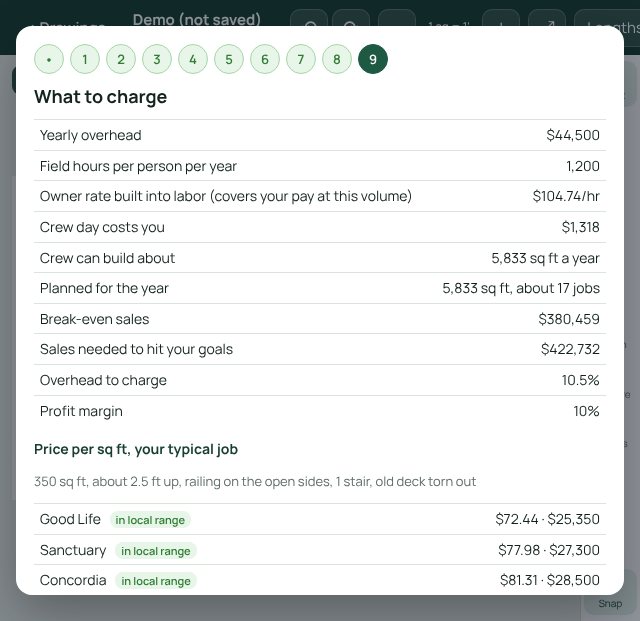
The pricing setup results showing overhead, break-even and price per square foot

Know what to charge

A short guided setup asks about your business, not someone else's.

  • Your products, material prices and job costs
  • Your crew size and how long a box deck and a complex deck take you
  • Your yearly costs, your pay and your profit goal
  • It works out your overhead, break-even and price per square foot
  • It shows the sales and number of jobs you need to hit your goal, and warns you if that's more than your crew can build

Run every job from one place

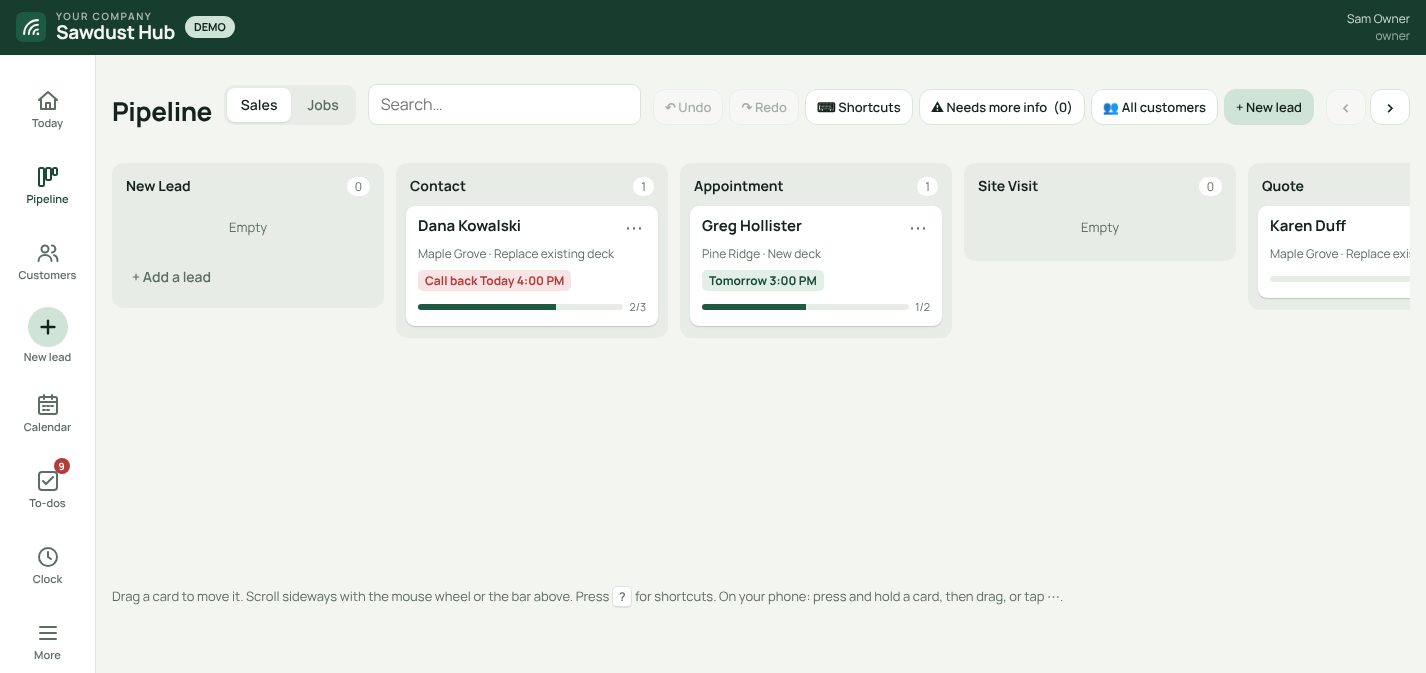
Leads, appointments, quotes, sold jobs, the schedule and the crew, on the phone or the iPad.

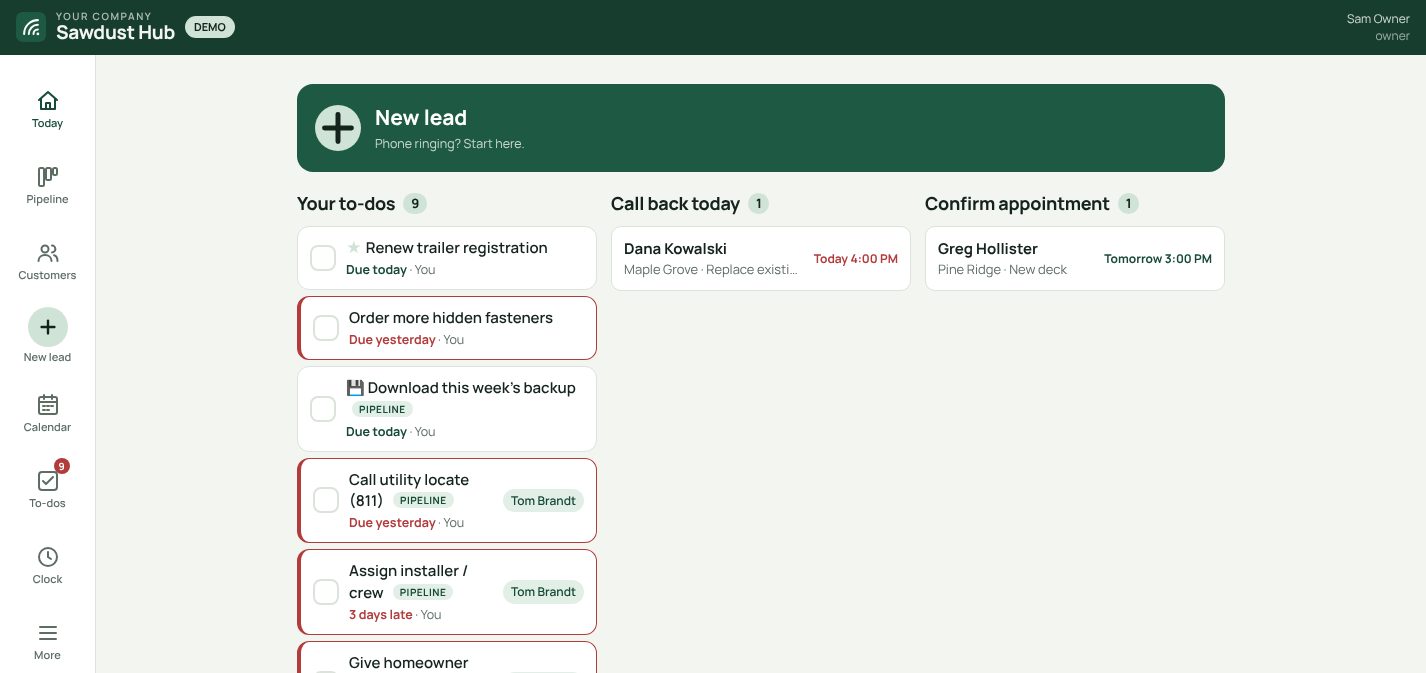
Today screen with to-dos and callbacks
Today: your to-dos and who to call back
Sales pipeline board
Pipeline: every lead from first call to sold
Calendar with appointments and build starts
Calendar: appointments and build starts

Three plans

Start with drawings and move up whenever you're ready. Every plan is your own private copy, set up for you.

Drawing

$40/month

Replace your drawing app.

  • Draw decks, stairs, railing and posts with your finger or a pencil
  • Lines snap and line up, and you can type exact lengths
  • Your logo on every drawing sheet
  • Save as a picture to send or sign
Try it

Quoting

$60/month

Drawing plus a price before you leave the driveway.

  • Everything in Drawing
  • Material list and price straight from the drawing
  • Railing styles, screws and boards counted for you
  • Your material prices, crew size and crew speed
  • Guided pricing setup: your products, costs, crew, pay and profit goal, and it works out what to charge
Try the pricing setup
Everything

Full hub

$200/month

Run the whole company from it.

  • Everything in Quoting
  • Leads, appointments, quotes, sold jobs and the schedule in one place
  • Automatic to-dos for every step, assigned to the right person
  • Job files, crew logins, completion checklists and offline mode
  • Send quotes from your own Gmail, with a page the customer opens to see their quote
  • Website price tool: homeowners sketch their deck on your website and see a price range from your own numbers. The lead lands on your list with their drawing, and you get an email.

See the price tool

Try it

Why it's different

It was built on real jobs, not in an office.

Your numbers, not ours

Prices, labor and markup all come from your own costs. Nothing is a national average.

Walled off from everyone else

Your customers, prices, photos and crew are locked to your company. No other builder can see them.

Made for the iPad on site

Big buttons and a drawing screen made for a finger or a pencil, standing in the customer's yard.

Getting started

  1. Start your free trial with your company name. It takes a minute.
  2. Add your logo. It goes on every screen, PDF and drawing sheet.
  3. Answer the pricing setup with your own costs, crew speed and income goal.
  4. Send your crew the team link, then draw and quote your next job.

Want a hand setting up? Call or text and we'll do it with you. Or look around the demos first, they take about a minute.

How support works

Most changes you make yourself, and help is one tap away.

Change it yourself

Prices, materials, crews, your logo, your checklist and your quote style are all on one Settings page.

Answers in the app

Tap Help for step-by-step answers, in the hub and in Draw. Or read them on the help page.

A real reply, fast

Something broken or have an idea? Tap Help, then Report something. We reply within 1 business day, Monday to Friday. If it stops you from working, mark it and we work on it first.

We read every idea. The good ones get built for every company at no extra cost, and you'll see them under What's new. We don't do custom one-off builds.